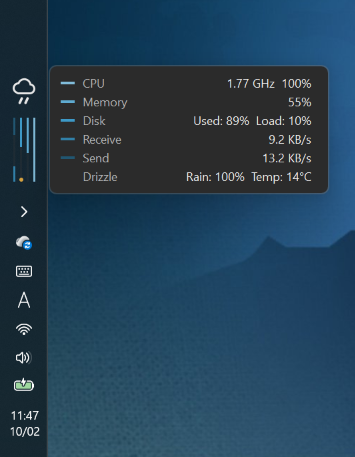
BAR・BAR 1.5.0, the tiny system monitor that blends into the Windows taskbar, is out. Windows 11 26H2 lets you put the taskbar on the left or right of the screen, and 1.5.0 supports these vertical taskbars.
What’s new
- Vertical taskbars: with the taskbar on the left or right, BAR・BAR rotates its bars by 90 degrees to fit the vertical strip, just above the notification area. It works with the taskbar at the top, bottom, left or right, and taskbars on secondary displays follow in the same way.
- Choose the direction of rotation: in Settings → Appearance → “On a vertical taskbar”. “Rotate right (top to bottom)” (the default) puts the weather icon at the top with the lines growing downwards; “Rotate left (bottom to top)” puts the weather icon at the bottom with the lines growing upwards.
- Hover panel: on a vertical taskbar it opens beside the bars (to the right on a left-side taskbar).
- Settings preview: the frame is now square, and it shows a vertical picture when the taskbar is vertical.
- Default line length: changed from 96 to 64 so it fits in less space. Your existing settings are not changed.
Download
Download it from the BAR・BAR product page. Free for personal use.